Build-time macros
Keep a code example beside the component that explains it. During a Vite 8
build, @ferriki/vite replaces literal code() and <Code /> macro calls
with highlighted HTML and the CSS they need. React's default <Code />
presentation uses a small, framework-free module to display that prepared
output in the browser.
- Source codeA string, file or generated content
- codeToHtml()Run Ferriki in your build script or server
- Highlighted HTMLWrite a static page or send a server response
- BrowserDisplay the prepared markup
- code() or <Code />A literal example in your module
- Vite build@ferriki/vite highlights the example
- HTML and CSS in the bundlecode(): prepared data · <Code />: shadow code element
- BrowserRender without running a highlighter
Install and configure
npm install @ferriki/core @ferriki/vite
Use Vite 8 and Node.js 22.13.0 or newer. Keep @ferriki/core, its optional
platform package, and @ferriki/vite on the same release. The native platform
requirements are listed in Compatibility. If your
Vite React project does not already use the React plugin, install it with
npm install -D @vitejs/plugin-react.
The first build downloads the configured grammar and theme payloads from
assets.ferriki.dev, verifies them, and caches them locally. For offline
builds, prepopulate the cache or configure a mirror in asset settings.
Put Ferriki before React so the macro runs before JSX is lowered:
// vite.config.ts
import { defineConfig } from "vite";
import react from "@vitejs/plugin-react";
import { ferriki } from "@ferriki/vite";

export default defineConfig({
  plugins: [ferriki({ theme: "github-dark-default" }), react()],
});
Add your first React component
Import Code from the macro entry and write its source directly in the
component:
import { Code } from "@ferriki/core/react/macro";

export function Example() {
  return (
    <main>
      <h1>A code example, ready for the page</h1>
      <Code language="ts" source={`const answer: number = 42;`} />
    </main>
  );
}
Keep language and source literal. source may be a string or a template
literal without ${...} interpolation; the macro cannot evaluate variables,
imports, or computed strings. Render Example in your app, start Vite with its
usual command such as npm run dev, and open that route to see the highlighted
block.
Prepare code with code()
code() works in any JavaScript or TypeScript module:
import { code } from "@ferriki/core/macro";

export const example = code("export const answer = 42;\n", {
  language: "ts",
  meta: 'title="Answer" [TypeScript] {1}',
});
During the build, the call becomes a plain object, a PreparedCodeBlock:
| Field | Content |
|---|---|
code | The exact source, including its final newline |
language | The language as written |
html | The complete highlighted pre/code block |
css | The block's theme CSS and line-number and highlight rules, when it has any |
metadata | title, label, lineNumbers and highlightedLines, parsed from the options |
Render html inside a container, not inside another pre. Vite already
delivers the CSS: in class mode, the transformed module imports a generated
stylesheet. css is there for code that moves the descriptor outside that
module; do not inject it a second time.
The call takes these options:
| Option | Meaning |
|---|---|
language | Required, a nonempty string literal such as "ts" |
meta | Optional string literal: title="...", the first [label], line selections such as {2,4-5}, and showLineNumbers |
lineNumbers | Optional boolean literal that overrides the plugin default |
The source is a string literal, or a template literal without ${...}
interpolations; template escapes have their normal JavaScript meaning.
Variables, imported files and computed strings are not evaluated, and the
options must be an object literal. Anything dynamic fails the build with the
file and position.
Vite plugin options
| Option | Default | Meaning |
|---|---|---|
theme | "github-dark-default" | One theme for every block |
themes | none | Named themes; the first key supplies the default colors |
styleMode | "inline" | "classes" emits scope classes and matching CSS |
lineNumbers | false | Default for every macro; each call can override it |
transformers | none | Transformer callbacks applied to every prepared block |
assets | none | Asset source and cache settings, as for createHighlighter |
include | none | (id) => boolean for compiler output without a JS/TS extension |
Prepare code with <Code /> in React
import { Code } from "@ferriki/core/react/macro";

export function Example() {
  return (
    <Code
      language="tsx"
      className="example-code"
      maxLines={12}
      lineNumbers
      source={`function Hello() {
  return <h1>Hello</h1>;
}`}
    />
  );
}
The element is self-closing. source is a string literal or a template
literal without interpolations; JSX children are not supported. language is
required, and it, meta and lineNumbers are static, with the same meaning as
for code(). By default, the element becomes a <ferriki-code> Web Component
with the prepared HTML in an open shadow root and a local base-style element.
className applies to that host and theme selects a configured alias. The optional maxLines
runtime prop must resolve to a positive safe integer; omit it for an unlimited
block. These presentation props accept runtime expressions.
Spreads, duplicate attributes and other attributes fail the build.
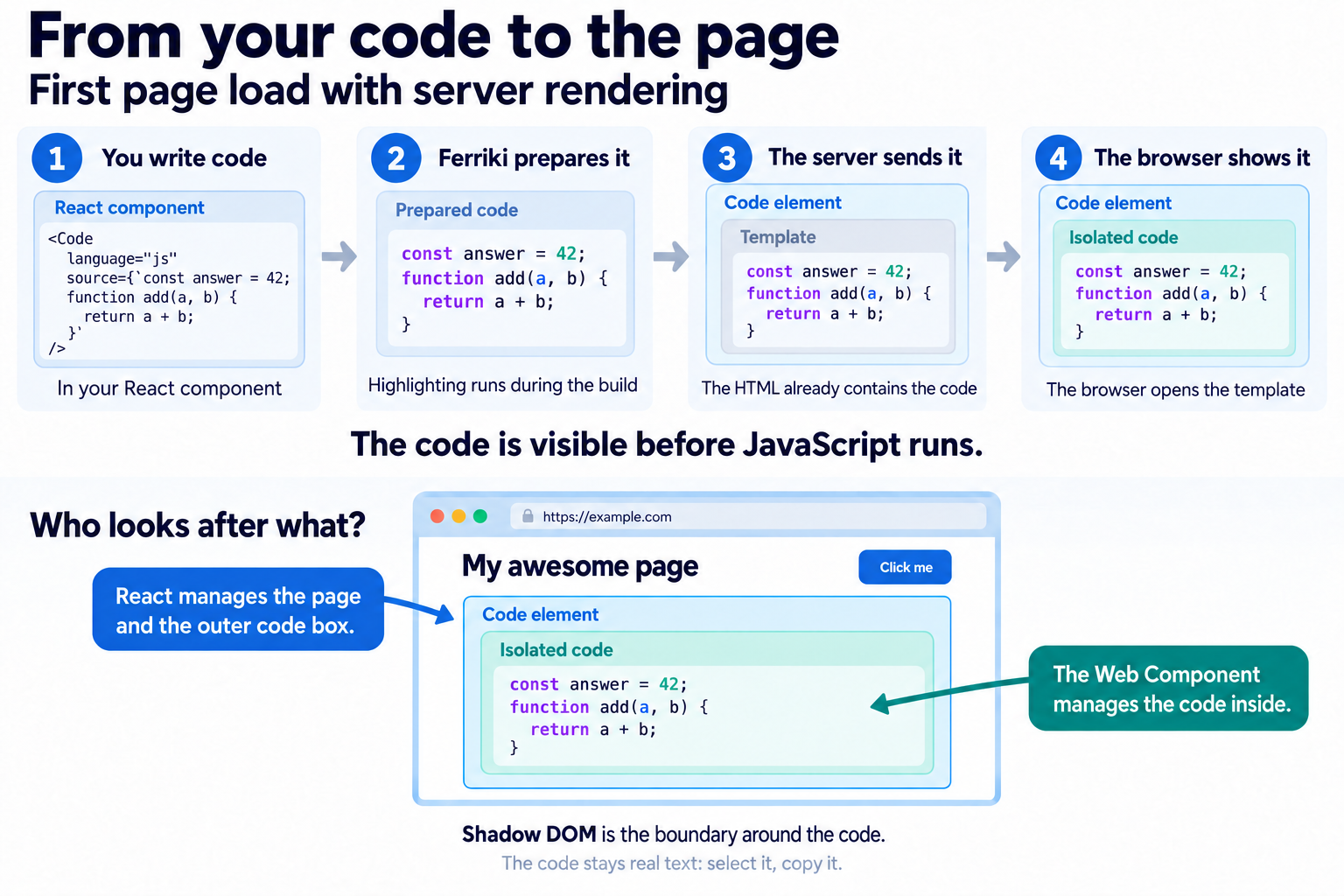
React manages the page and the outer code element. The Web Component manages the code inside. Shadow DOM is the boundary between them: page CSS selectors do not reach the inner code, and React does not manage its individual tokens. The code stays real text that people can select and copy.
For the first page load with server rendering, the server sends the actual highlighted HTML inside a template in the code element. The browser moves that template's contents into the isolated area before JavaScript runs. The template is gone, and the code is already visible. React attaches to the page and outer element while keeping the code inside in place. On later client navigation, the Web Component fills new code elements from prepared HTML in the browser modules; it does not run a highlighter.
The macro reserves space from the source line count for client-only mounts.
The optional maxLines prop caps the visible block while keeping all code
available for vertical scrolling; shorter blocks stay short. The reservation
uses the same cap, line height, and padding as the displayed code.
SSR and styles
The server template includes a local base-style element so the code is styled
before JavaScript. Register the component after document parsing so it reuses
the existing code. Inline mode needs no external CSS asset or Vite base URL.
Classes mode adds a link to one aggregated CSS asset, which remains after
upgrade; Vite serves it during development and emits a hashed file in
production. Deploy the SSR build's asset because the SSR and client build
graphs can produce different filenames. Direct class-mode macro SSR requires
an absolute Vite base path or URL. See the
Shadow code elements guide
for details. Page selectors do not reach inside the root, and ancestor theme
attributes do not select its theme: pass
theme={darkMode ? "dark" : "light"} explicitly. The first configured theme
supplies the default colors. See the Shadow code elements guide
for framework-free use, custom CSS, browser support, and CSP/Trusted Types limits.
Titles, copy buttons, and tabs can wrap the default <Code /> in ordinary React
components and keep its isolated code presentation. For complete control over
the result, pass a render function. This application-owned escape hatch
replaces the default presentation; the example below opts into light-DOM HTML
and its page CSS. It receives
{ code, className, theme, maxLines }, where code is the PreparedCodeBlock,
and runs during normal rendering, never at build time:
import { Code } from "@ferriki/core/react/macro";
import type { CodeRenderProps } from "@ferriki/core/react/macro";

function CodeBlock({ code, className }: CodeRenderProps) {
  return (
    <figure className={className}>
      <figcaption>{code.metadata.title}</figcaption>
      <button type="button" onClick={() => navigator.clipboard.writeText(code.code)}>
        Copy code
      </button>
      <div dangerouslySetInnerHTML={{ __html: code.html }} />
    </figure>
  );
}

export function Example() {
  return (
    <Code
      language="ts"
      meta='title="Answer" {1}'
      source={`export const answer = 42;`}
      render={(props) => <CodeBlock {...props} />}
    />
  );
}
The macro import is removed from the transformed module, so neither the
marker nor the build-time macro parser reaches the browser. Server rendering,
hydration and client navigation use the prepared HTML. The default React path loads only the
framework-free presentation module; code() alone has no presentation
runtime. Each React shadow root contains its local base-style element; classes
mode also links its aggregated external asset. code() and custom renderers
keep ordinary Vite stylesheet delivery.
Annotate lines with Shiki's notation
The transformers option applies transformer callbacks to every prepared
block, including the notation helpers from @shikijs/transformers (verified
with v4.4.3, Ferriki's Shiki baseline):
// vite.config.js
import { ferriki } from "@ferriki/vite";
import {
  transformerNotationDiff,
  transformerNotationFocus,
  transformerNotationHighlight,
  transformerNotationWordHighlight,
} from "@shikijs/transformers";

export default {
  plugins: [
    ferriki({
      transformers: [
        transformerNotationHighlight(),
        transformerNotationFocus(),
        transformerNotationDiff(),
        transformerNotationWordHighlight(),
      ],
    }),
  ],
};
Write // [!code highlight], // [!code focus], // [!code ++],
// [!code --] or // [!code word:answer] inside the macro's source. The
comments are removed from the highlighted HTML; the descriptor's code keeps
the source as written. In a TypeScript config, the helpers may need a type
assertion at this boundary: Ferriki's transformer context is not promised to
be type-interchangeable with Shiki's.
Which modules are transformed
The adapter is import-driven. Vite and Rolldown call its transform only for
JavaScript and TypeScript modules, and for IDs accepted by include, whose
source contains the text @ferriki/core/macro or @ferriki/core/react/macro.
Every other module is never parsed or changed. A module that passes is parsed
once with Vite's own parser, and the parse decides: a mention in a comment or a
string, or a type-only import, leaves the module unchanged.
Write the import specifier literally. A specifier spelled with escape
sequences, such as "@ferriki/core/\u006dacro", does not pass the text check:
that module is not transformed, and the marker throws its configuration error
when it runs.
The imported name is reserved
The local name a macro import binds, code, Code or an alias, is reserved in
its module. A declaration with that name fails the build: a variable,
function, class, parameter, destructured binding, catch binding, import, or a
TypeScript type alias, interface, enum or namespace, at the top level or in a
nested scope. Assigning the marker, passing it elsewhere or re-exporting it
fails as well, so every runtime use of the name refers to the macro.
A module that imports both macros and destructures ({ code }) in a renderer
therefore imports the function macro under another name:
import { code as prepareCode } from "@ferriki/core/macro";
import { Code } from "@ferriki/core/react/macro";
Errors
A macro error fails the build as a FerrikiMacroError with the code
FERRIKI_MACRO (Rolldown builds report it as pluginCode), the module ID, the
line and column, and a code frame that the dev server overlay and the build
output show. A syntax error in a module that imports a macro is reported at the
parser's position.
An unknown language warns once per module and produces escaped plain code. Missing assets and native failures fail the build. A marker that runs without the transform throws a configuration error that names the missing Vite setup.
Themes and CSS
Inline output already carries its colors in the highlighted HTML. With
styleMode: "classes", resolved token and theme rules live in generated CSS.
For code() and custom renderers, each transformed module imports a
content-addressed stylesheet. Set data-ferriki-theme="dark" on the prepared
block or an ancestor to switch themes in ordinary HTML.
Each <Code /> root has its own compact local style block for base
presentation and inline theme switching. In classes mode, roots in a build link
one aggregated external CSS asset. SSR and client builds can have different
graphs and asset hashes, so deploy the SSR build's CSS with its markup; direct
class-mode macro SSR requires an absolute Vite base. The runtime theme prop
selects the host's theme; ancestor theme selectors do not cross that boundary.
Public semantic color variables can still inherit from :root, a theme
container, or the host.
The surrounding presentation, such as titles and copy buttons, stays yours.
See Class-based output for the class contract and
the Shadow code elements guide
for the component's semantic color variables.
MDX and other compilers
The adapter has to see a compiler's output while that output still contains
the macro's import declaration and call. Use the compiler's JSX-output mode, run it earlier in Vite's
pre plugin tier than Ferriki, and pass include(id) for its module IDs
without a JavaScript or TypeScript extension. Such a module is parsed as TSX;
when the adapter emits JSX into it, the result declares the tsx module type,
so Rolldown lowers that JSX. A compiler that turns Markdown into JavaScript
within a single hook hides the macro from every other plugin.
Fenced code blocks in Markdown are not macros; your Markdown pipeline highlights them.
Rendering HTML in React
codeToHtml() returns an HTML string; code() prepares a descriptor with
that string in its html field. React escapes a string in {html}, so it
displays the tags as text. Use dangerouslySetInnerHTML to
insert the prepared markup in ordinary HTML. <Code /> supplies a shadow
host by default. The browser still parses prepared HTML; React manages only
the opaque host and does not create elements for each highlighted token.
Literal HTML cannot simply be pasted into JSX: attributes such as class
and style have different representations, and escaped source text must be
preserved. The current adapter keeps Ferriki's HTML intact instead of converting each
highlighted span into a React element. The resulting page still contains
ordinary pre, code and span elements.
Ferriki escapes the original source. Custom transformers control their own markup; only insert HTML from your highlighting pipeline.
The direct JSX experiment from
issue #221 was removed
in favor of an isolated Web Component. The Node HTML API and code() descriptor
remain unchanged.